
One stand, two screens
Put a drill or a song on the stand and start it: it begins on both devices at the same instant, with the student's pitch drawn on your screen as they sing. Pause, step to the next stage or start over from either side.
For voice teachers
Give homework your students sing into a pitch trainer, and get every take back with the recording and each note scored in cents. Teach the lesson itself on a call where the student's pitch draws on your screen as they sing.

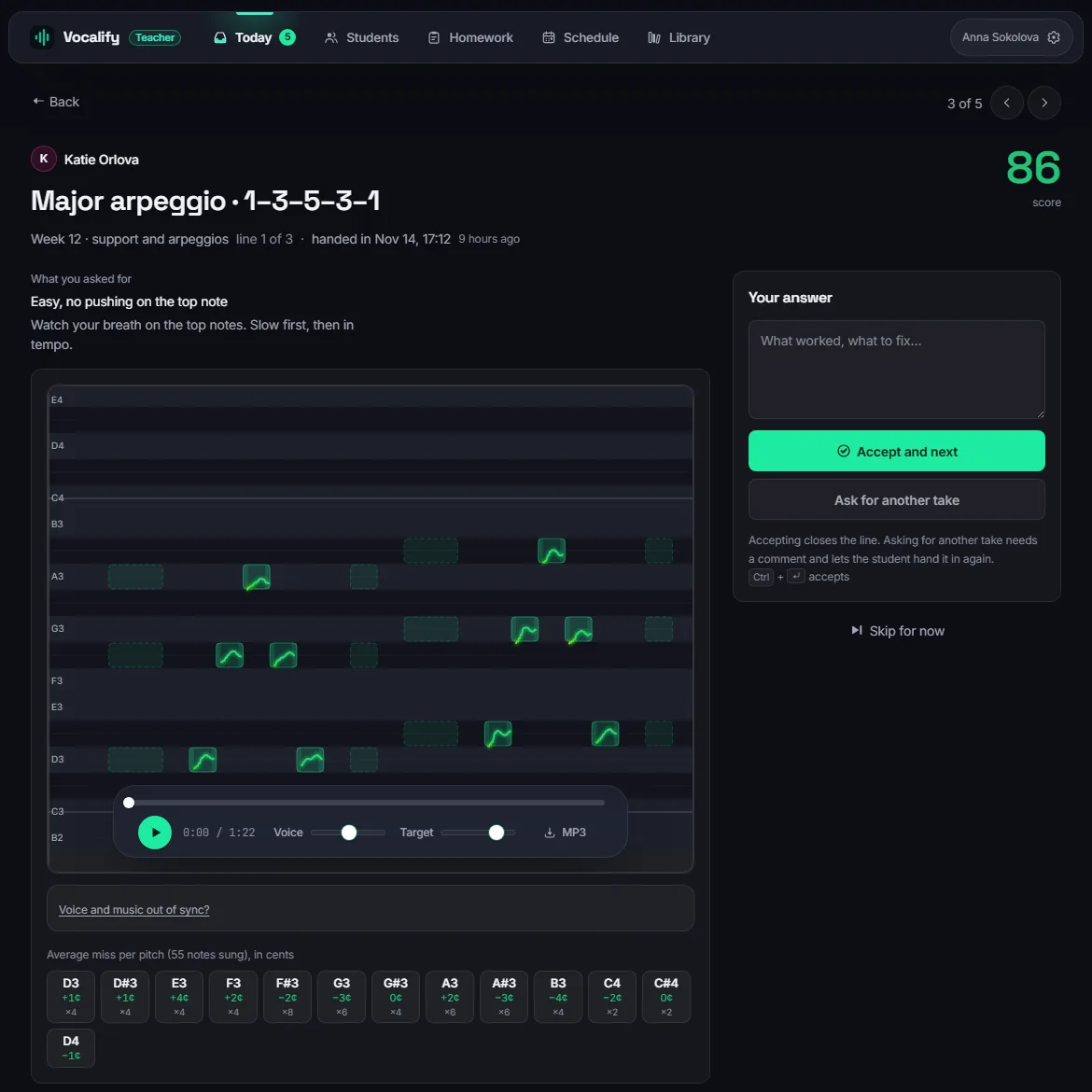
Every homework take comes back as a recording with the pitch drawn over the notes.
Cents per note instead of “a bit flat” — on the take and live in the lesson.
A set of exercises due on Thursday is a reason to practise on Tuesday.
Students, homework, schedule, your own exercises and songs, and the lesson call.
A homework set is a short list: a warm-up, a scale from a set start note, a song with its backing track, a free recording. Your student sings each line in the Vocalify app and hands it in. You open the take and see exactly where each note landed.
A video call loses exactly what a voice teacher listens for. In a Vocalify lesson the call is only half of it: the exercise runs on both screens at once, and the student's voice reaches you as a measured line, not as compressed audio.
Put a drill or a song on the stand and start it: it begins on both devices at the same instant, with the student's pitch drawn on your screen as they sing. Pause, step to the next stage or start over from either side.
Replay any run together during the lesson, and draw on it — both of you see the pen and the pointer.
Camera and voice in the same window. The exercise and its backing are mixed into the student's sound so you hear what they hear.
Send one link for a trial lesson. The student can open it without an account.
Scan a QR code to take the call on your phone and keep the stand full-size on the laptop.
Notes you both write during the lesson, and a tuner for free singing with a take you can keep.
Their open homework and what is waiting for you, the lessons booked with them, and the range you train them in — so the exercises you assign start where their voice actually is.

No setup call, no import. Your students keep using a free singing app they can also practise in on their own.
Your name, email and a password. We send a code to confirm the address.
Send the invitation link in any messenger. They open it, sign in and join you in one press.
Pick exercises from the library or a template, set them up for the student, set a due date.
Takes come in to Today. Accept, or ask for another one — and see it all again in the lesson.
Yes. The teacher cabin — students, homework, marking, the schedule, your own library and live lessons — costs nothing and needs no card. Your students use the singer's app, which is free for practice; songs you assign do not use up their free 20 minutes a day of singing along to songs.
A browser with a microphone, or the Android app. They join from the invitation link you send, with a free account, and see your homework in the app. For a one-off lesson you can also send a lesson link that a student can open without an account.
For one-to-one lessons, yes: the lesson has its own video call, and an exercise you put on the stand starts on both devices at the same moment, so the student's pitch arrives as a measured line on your screen rather than as audio squeezed through a call. Group lessons are not supported. How this compares with Zoom, Singing Carrots Studio and desktop pitch displays: apps for voice teachers, compared.
Yes. Next to the built-in library you can write your own exercises and melodies, and add songs with a backing track. Each homework line is set up for the student — start note, tempo, what to watch for.
Every take arrives with the recording, the pitch line drawn over the target notes and a score per note in cents. You listen, accept it or ask for another take with a comment, and the next take opens on its own. Takes waiting for you are listed on the Today page.
Pitch is measured about a hundred times a second on the student's device and scored per note in cents, with the delay of Bluetooth headphones and speakers compensated. A laptop or phone microphone is enough; headphones keep the backing out of the recording. More on how scoring works is on the singer's page.
The student and the teacher they joined. Recordings are stored to be listened to and marked, not shared. See the privacy policy.
Create your cabin, invite one student and give them one exercise. You will see the first take the same day.
Already have one? Sign in.