Best apps for voice teachers
A voice teacher's software does four jobs: run the lesson, show what the voice is doing, carry homework between lessons, and keep the studio's diary and bills. Few tools do more than one of them. Here is which does what, what it costs, and where each one stops. One of them is ours, Vocalify, and we say so wherever it comes up.
Prices and plans change. Each product's own page, linked below, is the source of truth, not this one.
On this page
The short answer
- One-to-one lessons where you want to see the student's pitch, plus homework you can check by eye: Vocalify (ours; free for teachers).
- Small group lessons, up to three students, recorded with AI summaries: Singing Carrots Studio (free for teachers).
- Students who already live on Zoom: Zoom with Original Sound for Musicians switched on — every lesson, it does not stay on by itself.
- Voice analysis in the studio room: Sing&See for a clear pitch display, VoceVista for spectrograms and resonance work.
- Practice assignments for a mixed studio, not just singers: Vivid Practice.
- Scheduling and invoices: My Music Staff. None of the singing tools here bill your students.
The four jobs, and which matter most
- The lesson itself. Online, that means a call that does not mangle a sung note. General video calls are tuned for speech: they cut sustained tones as "noise" and level out loud and soft singing. A singing lesson needs that switched off at the very least.
- Seeing what the voice does. Your ear is the main instrument, but a pitch line settles arguments the ear cannot — "you went flat on the way down" lands differently when the student can see it. Reviews of real-time visual feedback in singing training find it speeds up accurate intonation, especially for beginners[1].
- Homework between lessons. The week between lessons is where the voice changes or does not. A recording tells you whether they practised; a recording with the pitch drawn on it tells you what they practised, and you can check it in a minute rather than five.
- The studio's paperwork. Diary, reminders, invoices. Necessary, and nothing to do with singing, which is why the tools that do it well are generic music-studio tools.
How we checked this
On 15 November 2026 we opened each product's own website and read what it says it does and what it charges, rather than copying another roundup. Where a page did not say something — whether a lesson room shows pitch, say — we write "not stated" instead of guessing. Where only third-party sources gave a price, we say that too.
We have not run a trial of each tool with real students, and the judgements about who each suits are opinions. We built one of these tools. Read the Vocalify entry with that in mind, and compare it against the others' own pages.
Comparison at a glance
| Tool | Main job | Pitch in the lesson | Homework | Price for the teacher | Runs on |
|---|---|---|---|---|---|
| Vocalify | 1:1 lessons + sung homework | Yes, both screens | Takes with pitch + score | Free | Browser, Android |
| Singing Carrots Studio | Video lessons, up to 3 students | Not stated | AI coach for students (paid) | Free | Browser |
| Zoom | General video calls | No | No | Free plan with a time limit; paid plans | Desktop, phone, browser |
| Sing&See | Pitch display in the room | Only via screen share | No | $49 / $99 Pro, one-off | Windows, Mac |
| VoceVista | Spectrogram + voice analysis | Only via screen share | No | $49 / $99 / $399, 30-day trial | Windows, macOS |
| Vivid Practice | Assignments + practice tracking | No | Assignments, any instrument | Free for 1 student; from $9/mo | App (platforms not stated) |
| Marco Polo | Video messages | No | Video back and forth | Free; Plus $9.99/mo | iOS, Android |
| My Music Staff | Scheduling, billing | No | Not its job | About $16.95/mo* | Browser, apps |
* Price from third-party listings (GetApp, Frontdesk Review); My Music Staff's own pricing page was not read for this check.
The tools, one by one
Vocalify — lessons and homework with the pitch drawn in
Ours. A teacher cabin next to a singing app students already use for practice. In a live lesson you put an exercise or a song on the stand, it starts on both devices at once, and the student's pitch reaches your screen as a measured line over the target notes — measured on the student's phone or laptop, not from audio the call has already squeezed. Homework is a list of lines (an exercise or a song, with its start note and tempo); every take comes back with the recording, the line and a score per note, and you accept it or ask for another with a comment. You can write your own exercises and add songs with a backing track.
Best for one-to-one teachers who want to see intonation, live and between lessons. Where it stops: no group lessons, no invoices or payments, and the teacher side is new, so expect it to keep changing. Students use a browser or the Android app; there is no iOS app, though the browser works on an iPhone.
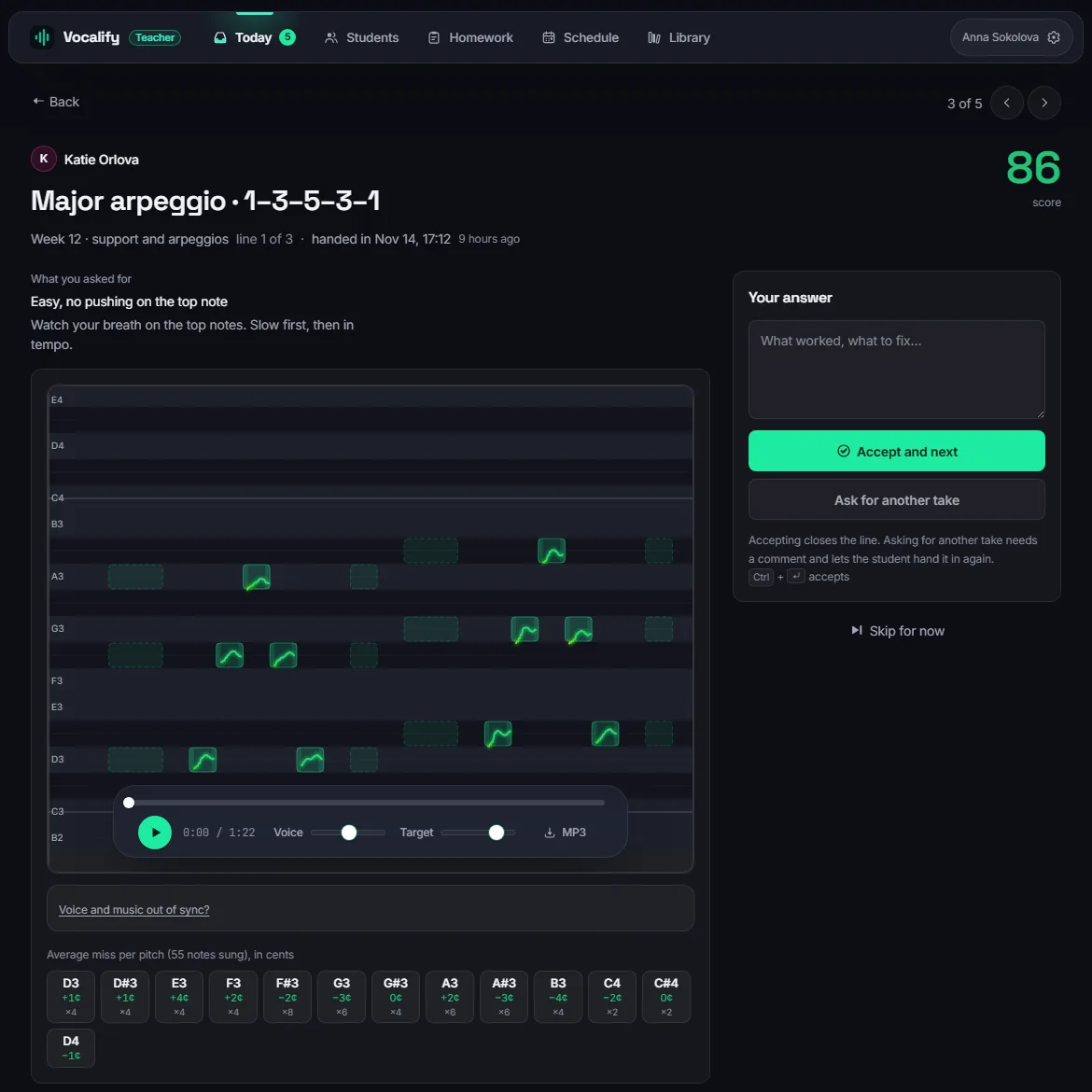
Ours. Free for teachers, no card.·vocalify.me/teachers
Singing Carrots Studio — a free lesson room, small groups welcome
Singing Carrots, known for its range test and pitch games, now runs a video lesson room for voice teachers. Its own page says the teacher pays nothing: HD video, "studio audio", recordings and AI summaries, with no 40-minute cutoff and up to four people per call — you and three students. Every lesson is recorded, transcribed and summarised. Students join free; what they can buy is an AI coach that continues practice at home from the lesson's summary.
Best for teachers who give small group lessons, or want a written summary of every lesson without taking notes. Not stated on its pages: whether the student's pitch is shown live during a lesson, and whether a student can sing an assignment that you then review. Teachers can earn a referral reward when students upgrade; the terms differ between its pages, so read them before counting on it.
Checked 15 Nov 2026 on its studio page and teachers' docs.·singingcarrots.com/studio
Zoom — fine for singing once you change one setting
Most voice teachers moved online on Zoom, and most students already have it. Out of the box it treats a held note as noise and fades it; Original Sound for Musicians (Settings → Audio) turns that processing off, and guides for musicians add echo cancellation back if the student is not on headphones. The catch teachers keep reporting is that the setting has to be switched on again in each meeting.
Best for keeping students where they already are. What it cannot do is show you pitch: you hear the student through a compressed call and judge by ear. The free plan limits meeting length; Zoom's own help page has the current rule for one-to-one calls, which third-party sources disagree about.
Checked 15 Nov 2026. Setup steps from university and music-school guides for Zoom.·Berklee Online: Zoom audio for music
Sing&See — a clear pitch display for the studio
Long-standing desktop software that shows the voice in real time as a piano keyboard, a stave, or a continuous pitch trace. The Professional version adds spectrum views, longer recordings and pitch-target exercises for students. A one-off purchase: $49 for the student version, $99 for Professional, for Mac or PC.
Best for in-person lessons, with the screen turned towards the student. Online, its site describes no remote feature, so it shows the voice of whoever is at that computer's microphone. See seeing pitch over a call.
Checked 15 Nov 2026 on its home and purchase pages.·singandsee.com
VoceVista — spectrograms for resonance work
The tool of choice for teachers who work on formants, vowels and resonance: a live spectrogram with a pitch line, overtone spectrum and waveform. Three editions per user: Basic $49, Video $99 (adds video synced to the spectrogram, a vowel chart, side-by-side comparison) and Pro $399 (vibrato analysis, EGG support, data export). Windows and macOS, with a 30-day trial of every edition.
Best for voice-science-minded teachers and studios that record and study takes in detail. Not for homework or remote lessons — no remote feature is described.
Checked 15 Nov 2026 on its home and products pages.·vocevista.com
Vivid Practice — assignments for any instrument
A practice-assignment app for music teachers in general. You upload assignments (with audio, video or PDFs attached), sort them into folders, message students, and see what they are practising; students get reminders and four practice modes. Free for one student, then $9 a month for up to 10, $19 for 25, $29 for 50.
Best for teachers with a mixed studio — piano and voice, say — who want one assignment list for everyone. For singing specifically, it does not listen to the student: student recordings are not mentioned on its site, and nothing measures pitch.
Checked 15 Nov 2026 on its home page, prices included.·vividpractice.com
Marco Polo — video messages for feedback between lessons
A video messenger, not a teaching tool, but one some voice teachers use for asynchronous feedback: the student sends a clip, you reply with a clip. The free app is unlimited; Plus, with extras, is $9.99 a month or $79.99 a year by its own support page.
Best for a personal, low-tech feedback loop with a few students. Where it stops: each clip has to be watched in full, there is no target to sing against, and nothing ties a clip to an exercise.
Checked 15 Nov 2026 on its support pages.·Marco Polo Plus FAQ
My Music Staff — the diary and the invoices
Studio management for music teachers, best known for the calendar and the invoicing. Third-party listings give a single plan at about $16.95 a month with unlimited students and a 30-day trial.
Best for the part of teaching nobody enjoys. It pairs with any of the tools above rather than replacing them.
Checked 15 Nov 2026 — price from GetApp and Frontdesk Review, not the vendor's own page.·mymusicstaff.com
Tonara — gone since December 2023
Still recommended in older lists of music-teacher apps. Tonara, a practice-tracking app for music students and teachers, was shut down on 8 December 2023; its App Store listing was last updated in October 2023. Teachers who used it wrote about moving to Vivid Practice and Practice Space.
Not a ranked league table: a map of common options, from their own public pages. We have a stake in one of them. Most teachers end up with two tools — one for lessons and homework, one for the paperwork.
Seeing a student's pitch over a call
There are two ways to see a remote student's pitch, and they measure different things.
- A pitch display on your side, listening to the call. It measures the audio after the call has processed it: noise suppression, automatic gain, packet loss. Held notes get trimmed, and a dropped packet looks like a wobble the student never sang.
- Measured on the student's device, sent as data. The student's own microphone is measured before the call touches it, and only the line travels. This is how Vocalify's lessons work, and why the line on your screen matches what the student sang even when the video stutters.
A middle way works with any desktop tool: the student runs Sing&See or VoceVista and shares their screen. It is accurate, but the student needs the software on a computer, and you see the display at the frame rate of a screen share.
By what you need
| If you want… | Look at |
|---|---|
| To see intonation in one-to-one online lessons | Vocalify |
| Homework you can check by eye, not only by ear | Vocalify |
| Small online groups, recorded and summarised | Singing Carrots Studio |
| To stay on the call app students already have | Zoom with Original Sound |
| A pitch display on the studio screen | Sing&See |
| Formants, vowels, resonance | VoceVista |
| One assignment list for a mixed-instrument studio | Vivid Practice |
| Scheduling and invoices | My Music Staff |
See your students' pitch, in lessons and in homework
The Vocalify teacher cabin is free. Make one in a minute and send your first student the invitation link.
Create a free cabinFAQ
What is the best app for online voice lessons?
For one-to-one lessons where you want to see the student's pitch, a lesson room built for singing: Vocalify draws the student's pitch on both screens during the lesson. For groups of up to three with recordings and summaries, Singing Carrots Studio. Zoom works with Original Sound for Musicians switched on, but shows no pitch.
Is Zoom good enough for singing lessons?
It can be. Switch on Original Sound for Musicians in every meeting, and ask the student to use headphones or keep echo cancellation on. What it cannot do is tell either of you how far off a note was.
How can I see a student's pitch during an online lesson?
Either the student runs a pitch display and shares their screen, or the lesson tool measures pitch on the student's device and sends you the line. The second avoids measuring audio the call has already compressed. More on the difference.
What app can students use to send singing homework?
A practice tracker like Vivid Practice organises the assignments; a messenger like Marco Polo carries the clips. An app made for singing sends each take with the pitch line over the target notes and a score per note, so you can see where it went wrong before you press play.
Is Tonara still available?
No. It was shut down in December 2023. Teachers who used it moved to tools such as Vivid Practice and Practice Space.
Are there free apps for voice teachers?
Yes. Vocalify's teacher cabin and Singing Carrots Studio are both free for the teacher. Vivid Practice is free for one student. Sing&See and VoceVista are one-off purchases (VoceVista with a 30-day trial), and My Music Staff is a monthly subscription.
References
- Hoppe, D., Sadakata, M., & Desain, P. (2006). Development of real-time visual feedback assistance in singing training: A review. Journal of Computer Assisted Learning, 22(4), 308–316.
Pages read, 15 November 2026
- Singing Carrots Studio and its docs for teachers.
- Sing&See — purchase page.
- VoceVista — products and prices.
- Vivid Practice — home page and prices.
- Marco Polo Plus FAQ.
- My Music Staff on GetApp — third-party price.
- Berklee Online: Zoom audio settings for music.
- Tonara (company) — Wikipedia, on the December 2023 shutdown.
A free cabin for your studio
Live lessons with the pitch on your screen, and homework that arrives already marked.
Create a free cabin